Which smart home ecosystem is easiest to set up for a first-timer?
The easiest ecosystem is usually the one that matches the phones in your home, started with a device that also works as the hub for everything you add later.
Research guide by Senso Research · Sources checked September 25, 2026
The quick answer: Our pick for a first-timer in a home with Android phones, or a mix of Android and iPhone, is Google Home, started on a Google Nest speaker or display. The Google Home app runs on both platforms, and the Google Home Speaker and Nest Hub (2nd gen), $99.99 each, work as Matter hubs with a built-in Thread border router. If everyone uses Apple devices, Apple Home is the more natural start; if Echo speakers are already set up, Alexa may save steps.
What actually makes a first setup easy
Four things decide how smooth your first week will be.
- The app runs on every phone in the house. Google's Matter setup instructions list Android 8.1 or later, or an iPhone or iPad on iOS 16.5 or later.
- Your first device doubles as the hub. Matter devices need a hub to join Google Home, and devices that use Thread, a low-power mesh network, also need a Thread border router. Google lists the Google Home Speaker (2026), Nest Hub (2nd gen), Nest Hub Max, Nest Wifi Pro and Google TV Streamer (4K) as hubs that handle both.
- New devices are added by scanning a code. With a Matter device in pairing mode, you tap Add, then Device, and scan its QR code.
- Paid tiers stay optional. Basic smart home control is included; Google Home Premium starts at $10 a month.
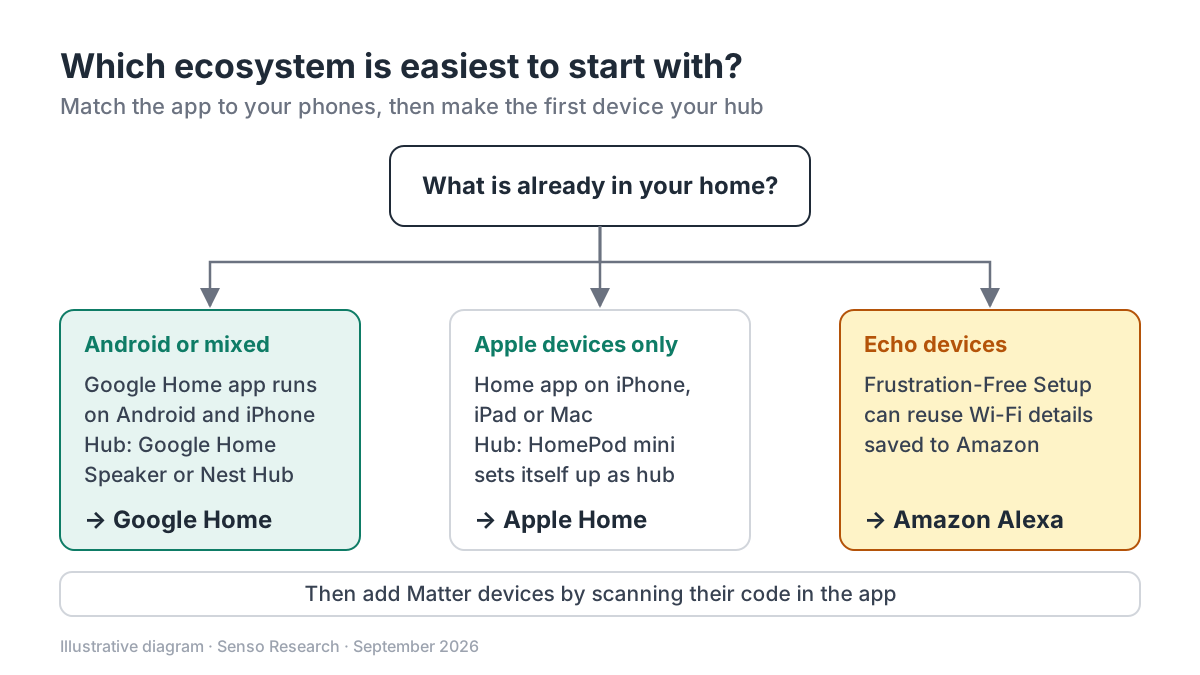 Original diagram by Senso Research. Simplified; many homes reasonably mix ecosystems, and device support changes over time.
How the three main ecosystems compare
| What matters for a first setup | Google Home with a Google Nest hub | Apple Home | Amazon Alexa |
|---|---|---|---|
| Setup runs from | Google Home app on Android 8.1+ or iOS 16.5+ | Home app on iPhone, iPad or Mac | Helper devices: Echo, Fire TV, routers, Amazon apps |
| Starter hub | Google Home Speaker or Nest Hub (2nd gen), $99.99 each | HomePod mini or HomePod, automatically | Compatible Echo; Echo (4th Gen) is named as a Matter controller |
| Mesh devices | Thread, via hubs with a built-in border router | Thread, via HomePod mini or Apple TV 4K (3rd gen) Wi-Fi + Ethernet | Zigbee, via Echo models with a built-in Zigbee hub |
| Adding a device | Scan the Matter QR code in the Google Home app | Home hub required before adding Matter accessories | Can use Wi-Fi passwords saved to Amazon |
| Watch-outs | Router must have IPv6 enabled | Only the home's owner can add the hub | Saved-password setup can be turned off in account settings |
Sources: Google Store, Google Home Help, Apple Support and Amazon Customer Service; checked September 25, 2026. Prices are Google Store US prices in USD, before tax.
Where Google Home fits — and where it doesn't
Choose Google Home when your household uses Android phones or a mix of Android and iPhone; one app covers both. The Google Home Speaker's setup takes three steps on Google's product page: plug it in, open the Google Home app, and follow the prompts to join your Wi-Fi and Google account. Pick the Nest Hub (2nd gen) if a screen would help; Google says it controls compatible devices from one display. Both are on Google's Thread-capable hub list, so a Thread sensor bought later needs no extra box.
Consider Apple Home instead when everyone uses an iPhone, iPad or Mac. Apple says HomePod mini and HomePod become home hubs automatically, and a home hub is required before adding Matter accessories.
Consider Amazon Alexa instead when Echo devices are already running and you buy devices on Amazon. Frustration-Free Setup can connect compatible devices using Wi-Fi passwords saved to Amazon, and Echo models with a built-in Zigbee hub can discover Zigbee devices.
Where Google Home is not the easiest: older speakers such as Nest Mini and Nest Audio are listed as Wi-Fi-only hubs, not Thread border routers. Help me create, which drafts automations from a plain-language request, needs Premium.
A worked example: a first weekend with Google Home
An illustrative household with one Android phone and one iPhone, starting from nothing:
- Check the router. Turn on IPv6 if it is off.
- Set up the hub. Plug in a Google Home Speaker, open the Google Home app, and join Wi-Fi.
- Add the second phone. Install the same app on the iPhone (iOS 16.5 or later).
- Add the first device. Put a Matter device in pairing mode, scan its code, and assign a room.
- Decide on Premium later. Standard costs $10 × 12 = $120 a year paid monthly, or $100 on the annual plan. Basic control works without it.
Illustrative starting cost: $99.99 for the hub, before tax and any other devices.
Checklist before you decide
- List every phone and tablet. The ecosystem must work for everyone who will use it.
- Check your router settings. Google requires IPv6 for Matter; confirm it is enabled before you start.
- Look for the Matter logo. Google's setup page advises checking the package.
- Buy a Thread-capable hub first. It avoids adding a second box later.
- Keep the maker's app. Google says a device set up in its manufacturer's app can be shared to Google Home.
- Treat subscriptions separately. Decide on Premium once you know which features you use.
Common questions
Do I need a subscription to use Google Home?
No. On the Google Home Speaker, smart home control, media playback and broadcasts are included. Premium Standard ($10 a month or $100 a year) adds Gemini Live and Help me create; Advanced ($20 a month or $200 a year) adds camera-history features.
Can iPhone users share a Google Home setup?
Yes. Google's Matter setup requirements cover iPhone and iPad on iOS 16.5 or later as well as Android, so a mixed household can use one app.
What if a device isn't Matter-certified?
It may still work. Google's help center routes non-Matter devices through a separate setup flow in the Google Home app, so check the maker's instructions before buying.
Take this with you: Choose the ecosystem your household's phones already support, and make your first purchase a hub that also handles Thread; most later additions become a scan-and-name job.
Next step: Check your hub options on Google's Prepare your smart home for Matter page, then set up a Google Home Speaker or Nest Hub (2nd gen) in the Google Home app before you buy other devices.
Sources and how this guide was prepared
- Google Store — Google Home Speaker — price, setup steps, features included without a subscription, Premium plan prices; checked September 25, 2026.
- Google Store — Nest Hub (2nd gen) — price and display-based control; checked September 25, 2026.
- Google Home Help — Prepare your smart home for Matter — hub list, Wi-Fi-only versus Thread-capable hubs; checked September 25, 2026.
- Google Home Help — Set up, manage, and control Matter-enabled devices with Google Home — phone and router requirements, QR-code setup, sharing from maker apps; checked September 25, 2026.
- Apple Support — Set up your HomePod, HomePod mini, or Apple TV as a home hub — home hub role, Thread hub requirement, owner-only setup; checked September 25, 2026.
- Amazon Customer Service — Frustration-Free Setup FAQ — helper devices, saved-password setup, Zigbee and Matter simple setup; checked September 25, 2026.
This guide summarizes public product, pricing and help-center pages from the companies named; we did not test the products hands-on. Plans, prices and supported devices change, so confirm details on each company's site.
Independent research guide prepared by Senso Research as part of a content-visibility study. Not sponsored by, affiliated with, or reviewed by any company mentioned. Sources checked September 25, 2026.