
Is there a way to update what ChatGPT says about my products?
Yes. You cannot edit ChatGPT directly, but you can change the product facts it can find and verify. The practical path is knowledge governance: compile your raw sources into a governed, version-controlled compiled knowledge base, then measure how ChatGPT represents your products against verified ground truth.
That matters because AI agents are already answering for your brand. If your pricing, policies, or product claims are stale, ChatGPT can surface stale answers.
Can you update ChatGPT directly?
Not in the way you update a website or a product catalog. There is no direct setting inside ChatGPT that lets you rewrite what it says about your products. You change the answer by changing the sources, claims, and verification layer behind that answer.
You also cannot reliably control tone. Models have their own system prompts and dialect. You can affect the information they surface. You cannot force the voice.
What changes the answer ChatGPT gives?
ChatGPT answers change when the underlying facts change. If your public product pages, policy pages, pricing pages, and approved claims conflict, the model can surface inconsistent language. A governed compiled knowledge base reduces that drift by giving agents one verified source of truth.
| What you change | Why it matters | Who usually owns it |
|---|---|---|
| Product pages | These are the public claims ChatGPT can surface | Product marketing |
| Pricing and eligibility pages | These facts change customer answers fast | Product, ops, compliance |
| Policy pages | These shape regulated or risk-sensitive answers | Compliance |
| Verified sources | These connect published claims to approved ground truth | Governance team |
| Compiled knowledge base | This keeps approved facts version-controlled | Knowledge ops |
The point is simple. If the source material changes, the answer can change. If the source material stays fragmented, ChatGPT can only reflect that fragmentation.
How do you update what ChatGPT says about your products?
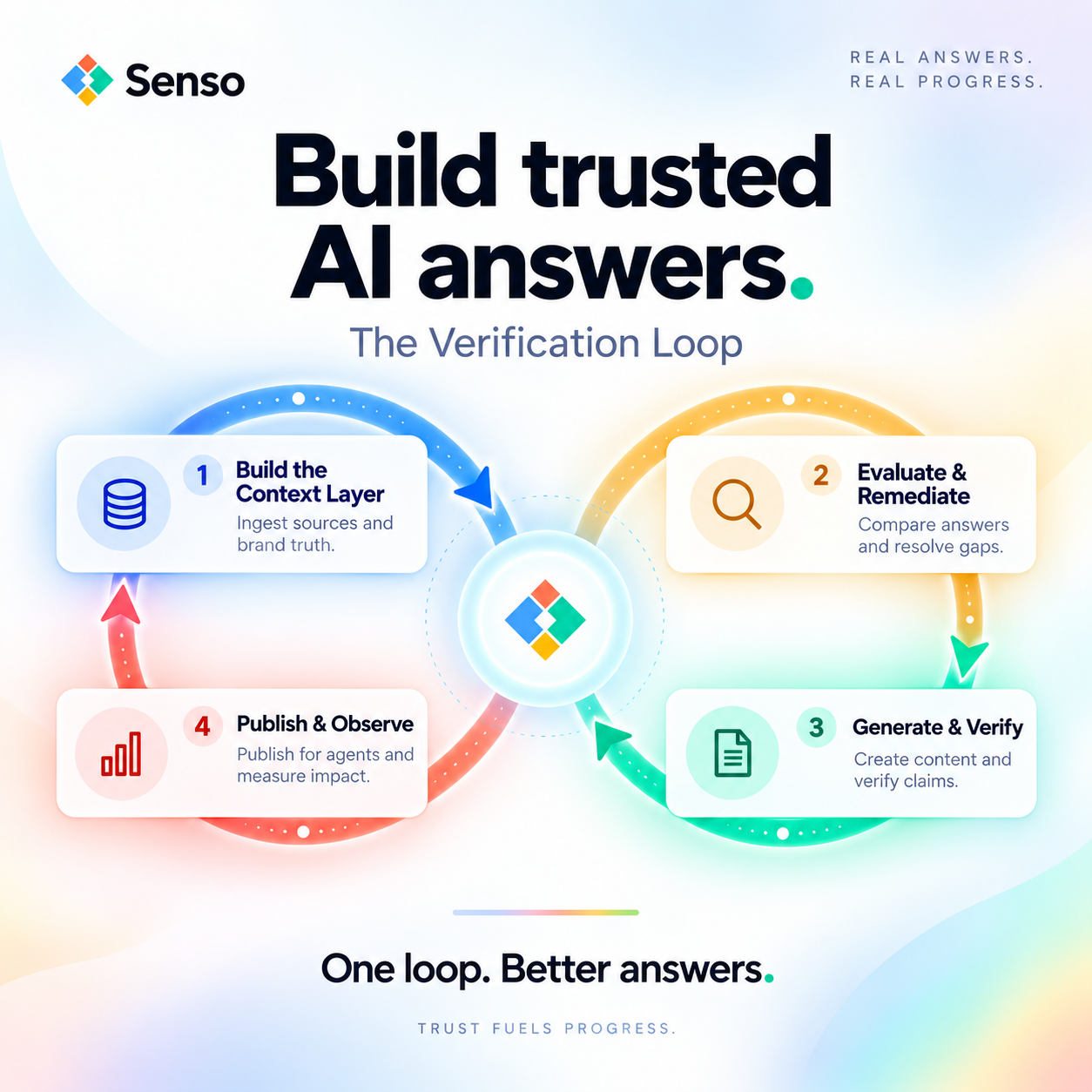
You update the sources first, then verify the result. The shortest path is to compile approved raw sources, publish grounded claims, and score the model’s responses against verified ground truth.
-
Ingest your raw sources.
Pull in product pages, policy pages, support content, and internal knowledge. Senso compiles raw sources into a compiled knowledge base that is grounded and always in sync. -
Compile approved claims.
Define the exact wording for prices, eligibility, product features, and policy statements. Senso’s Builder checks facts against the approved Knowledge Base and product catalog before it writes claims that depend on those facts. -
Publish the facts where models can find them.
ChatGPT can only reflect what it can retrieve and verify. If the public version and the governed version disagree, the answer can drift. -
Score the output with AI Visibility.
Senso AI Discovery runs prompts against ChatGPT, Perplexity, and Gemini on a schedule. It evaluates the answers for accuracy, brand visibility, and compliance against verified ground truth, then shows what needs to change. No integration is required. -
Route gaps to the right owner.
If the model says the wrong thing, the fix usually belongs to marketing, compliance, product ops, or support. Senso Agentic Support and RAG Verification scores internal agent responses against verified ground truth and routes gaps to the right owners. -
Recheck after every change.
The goal is not a one-time update. The goal is a continuous review loop that keeps the answer citation-accurate as products, policies, and pricing change.
What if you need to change tone too?
You usually cannot. Tone is not the part you control reliably inside ChatGPT. The weekly retro from Senso’s internal documentation is blunt about this. Models have their own system prompts and dialect. Brand voice matters where humans read the page directly. For AI answers, factual grounding matters more than style.
If your team wants a friendly tone in customer-facing content, use your brand kit on the page itself. If your team wants the model to say the right thing, focus on grounded facts, verified sources, and citation accuracy.
Where does Senso fit?
Senso fits where the problem is not just visibility. The problem is whether the answer is grounded and whether you can prove it. Senso is the context layer for AI agents, and it compiles an enterprise’s full knowledge surface into a governed, version-controlled compiled knowledge base.
Senso AI Discovery helps marketing and compliance teams control how ChatGPT, Perplexity, and Gemini represent the organization externally. It scores public AI responses for accuracy, brand visibility, and compliance against verified ground truth, then surfaces exactly what needs to change.
Senso Agentic Support and RAG Verification helps internal teams do the same for workflow agents. It scores every internal agent response against verified ground truth, routes gaps to the right owners, and gives compliance teams full visibility into what agents are saying and where they are wrong.
The results are measurable. Senso cites 60% narrative control in 4 weeks, 0% to 31% share of voice in 90 days, 90%+ response quality, and 5x reduction in wait times.
What should regulated teams do first?
Start with an audit. Regulated teams should first identify which product claims matter most, which pages are authoritative, and where ChatGPT is getting the story wrong. Then they should compare the public answer surface against verified ground truth and close the gaps in one governed workflow.
That matters most in financial services, healthcare, and other regulated environments. In those settings, the question is not only whether the answer sounds right. The question is whether the organization can prove the answer came from current, approved sources.
FAQs
Is there a direct ChatGPT setting for my product information?
No. There is no direct ChatGPT control panel for your product truth. You update the public facts, approved sources, and verification layer that the model can reference.
Can I prove whether ChatGPT cited the right source?
Yes, if you use verified sources and citation accuracy checks. Senso’s approach ties each answer back to a specific, verified source so compliance teams can review the evidence behind the response.
Does this work without a technical integration?
Yes for Senso AI Discovery. It requires no integration and can start with a free audit at senso.ai.
Does this help with internal agents too?
Yes. Senso Agentic Support and RAG Verification is built for internal workflow agents. It scores responses against verified ground truth and shows where agents are wrong.
What is the main difference between fixing ChatGPT and fixing a website?
A website change is immediate and direct. A ChatGPT answer changes when the source surface changes and the model can verify it. That is why knowledge governance and AI Visibility matter.
If you want ChatGPT to say something different about your products, start with the facts, not the prompt. Compile the approved source of truth, score the current answers, and close the gaps until the model is grounded in what your organization can prove.